背景
在中后台场景经常会使用 CSV 文件,本文面向的 CSV 文件的预览和截断场景。即数据来源可能是一个很大的 CSV,但我们只需要一小部分数据进行预览/操作,如果采用传统的方式,将数据全部下载然后加载到内存中可能会导致内存溢出和浪费带宽的情况。
为此很多时候需要对 CSV 的读取进行限制,如限制读取前 1W 行数据。
前置知识
本文例子基于 Node 版本 v16.13.0
在正式讲如何进行 CSV 行数限制之前,你需要对 Node 的 Buffer、Stream 和 readline 模块有一定的了解。
Buffer 是一种类似于数组的数据结构,用于处理二进制数据。可以简单的将 Buffer 视为整数数组,每个整数代表一个数据字节(Unicode 码)
1
2
3
4
| const buf = Buffer.from('Hey!')
console.log(buf[0])
console.log(buf[1])
console.log(buf[2])
|
这些数字是 Unicode 码,用于标识 buffer 位置中的字符(H => 72、e => 101、y => 121)。
流是为 Node.js 应用程序提供动力的基本概念之一。它是一种以高效的方式处理读/写文件、网络通信、或任何类型的端到端的信息交换。
在传统的方式中,当告诉程序读取文件时,这会将文件从头到尾读入内存,然后进行处理。

使用流,则可以逐个片段地读取并处理,而无需全部保存在内存中。

使用示例
一个典型的例子是从磁盘读取文件。使用 Node.js 的 fs 模块,可以读取文件,并在与 HTTP 服务器建立新连接时通过 HTTP 提供文件:
1
2
3
4
5
6
7
8
9
| const http = require('http')
const fs = require('fs')
const server = http.createServer(function(req, res) {
fs.readFile(__dirname + '/data.txt', (err, data) => {
res.end(data)
})
})
server.listen(3000)
|
readFile() 读取文件的全部内容,并在完成时调用回调函数。回调中的 res.end(data) 会返回文件的内容给 HTTP 客户端。
如果文件很大,则该操作会花费较多的时间。 以下是使用流编写的相同内容:
1
2
3
4
5
6
7
8
| const http = require('http')
const fs = require('fs')
const server = http.createServer((req, res) => {
const stream = fs.createReadStream(__dirname + '/data.txt')
stream.pipe(res)
})
server.listen(3000)
|
当要发送的数据块已获得时就立即开始将其流式传输到 HTTP 客户端,而不是等待直到文件被完全读取。
上面的示例使用了 stream.pipe(res) 这行代码:在文件流上调用 pipe() 方法。它获取来源流,并将其通过管道传输到目标流。在 HTTP 请求中,req 为可读流,res 为可写流,所以这里实现了边读文件边向 HTTP 响应里写数据,大大提高了大文件读取时效率。
从版本 7 开始,Node.js 提供了 readline 模块来执行以下操作:每次一行地从可读流(例如 process.stdin 流,在程序执行期间该流就是终端输入)获取输入,并输出到可写流(例如 process.stdout 流,在程序执行期间该流就是终端输出)。
1
2
3
4
5
6
7
8
9
| const readline = require('readline').createInterface({
input: process.stdin,
output: process.stdout
})
readline.question(`你叫什么名字?`, name => {
console.log(`你好 ${name}!`)
readline.close()
})
|
这段代码会询问用户名,当输入了文本并且用户按下回车键时,则会发送问候语。
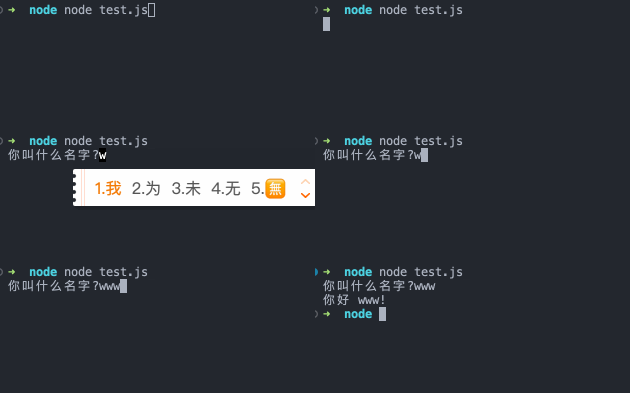
每当 input 流接收到行尾输入(\n、\r 或 \r\n)时,则会触发 line 事件。 这通常发生在用户按下 回车 或 返回 时。
如果从流中读取了新数据并且该流在没有最终行尾标记的情况下结束,也会触发 line 事件。大白话讲就是如果最后一行不是空行,也会触发 line 事件。
1
2
3
| readline.on('line', (row) => {
console.log(`Received: ${row}`);
});
|
了解了 Buffer、Stream 和 readline 模块之后我们就可以实现我们限制读取 CSV 行数的需求了。
代码实现
数据 Mock
进行 CSV 代码读取实现之前,我们先来造一个 100W 行数据的 CSV 文件,这里为了简单只造一列数据:0 - 10 亿之间的随机数。
1
2
3
4
5
6
7
8
9
10
11
12
13
14
15
| const csvStr = new Array(1000000).fill(0).reduce((prev) => {
prev += `${~~(Math.random() * 1000000000)}\n`;
return prev;
}, "");
fs.writeFile("example.csv", csvStr, (err) => {
if (err) {
throw err;
}
console.log("文件创建成功");
});
|
example.csv 文件的内容如下:
1
2
3
4
5
6
7
8
9
| 679519938
145613672
858808317
769253519
725174623
630348188
689373810
996864668
...
|
原生实现
我们先创建 CSV 文件的可读流,然后将其作为 readline 的输入流,监听 line 事件,在 line 事件里判断当前读取行数是否超出最大限制,若超出限制则调用 readline 的 close 方法关闭输入输出。最后将结果打印或写入一个文件进行验证。代码如下:
1
2
3
4
5
6
7
8
9
10
11
12
13
14
15
16
17
18
19
20
21
22
23
24
25
26
27
28
29
30
31
32
33
|
const readStream = fs.createReadStream("example.csv");
const maxRowCount = 10;
const rl = readline.createInterface({
input: readStream,
});
let lineCount = 0;
let csvData = "";
rl.on("line", (line) => {
if (lineCount >= maxRowCount) {
rl.close();
return;
}
csvData += `${line}\n`;
lineCount++;
}).on("close", () => {
readStream.destroy();
fs.writeFile("limit-result.csv", csvData, (err) => {
if (err) {
throw err;
}
console.log("结果写入成功");
});
});
|
需要注意的是:调用 rl.close() 并不会关闭原始的输入流,需要手动在 close 事件中调用 readStream.destroy() 关闭原始输入流。
查看 limit-result.csv 发现限制读取成功了
1
2
3
4
5
6
7
8
9
10
| 679519938
145613672
858808317
769253519
725174623
630348188
689373810
996864668
493033432
101512145
|
然后对于对上面的函数进行一层 Promise 封装,将最终结果为 JS 数组而不是 CSV 文件,再加上一些错误处理后最终代码如下:
1
2
3
4
5
6
7
8
9
10
11
12
13
14
15
16
17
18
19
20
21
22
23
24
25
26
27
28
29
30
31
32
33
34
35
| async function readlineLimitCsv(filePath, maxLineCount) {
const readStream = fs.createReadStream(filePath);
return new Promise((resolve, reject) => {
const rl = readline.createInterface({
input: readStream,
crlfDelay: Infinity,
maxLineLength: 1024,
});
let lineCount = 0;
let csvData = [];
rl.on("line", (line) => {
if (lineCount >= maxLineCount) {
rl.close();
return;
}
csvData.push(line.split(","));
lineCount++;
}).on("close", () => {
readStream.destroy();
resolve(csvData);
});
readStream.on("error", (err) => {
reject(err);
});
});
}
|
使用示例:
1
2
3
| readlineLimitCsv("./example.csv", 10).then((res) => {
console.log("最终结果为:%o", res);
});
|
结果如下:
1
2
3
4
5
6
7
8
9
10
11
12
13
14
| ➜ node test.js
最终结果为:[
[ '679519938', [length]: 1 ],
[ '145613672', [length]: 1 ],
[ '858808317', [length]: 1 ],
[ '769253519', [length]: 1 ],
[ '725174623', [length]: 1 ],
[ '630348188', [length]: 1 ],
[ '689373810', [length]: 1 ],
[ '996864668', [length]: 1 ],
[ '493033432', [length]: 1 ],
[ '101512145', [length]: 1 ],
[length]: 10
]
|
可以看到至此我们实现了对 CSV 行数读取的限制,实际开发中可根据业务进行调整。readline 模块也提供了 Promise 版本的实现 readline/promises,具体可以查看官方文档。
除了使用原生的 Stream 和 readline 模块外,也可以使用像 fast-csv 一样的 CSV 处理库,这里以 fast-csv 为例:
基础使用
1
2
3
4
5
6
7
8
9
10
11
12
13
14
15
16
17
18
19
20
21
22
| async function fastCsvLimitCsv(filePath, maxLineCount) {
const readStream = fs.createReadStream(filePath);
return new Promise((resolve, reject) => {
const parser = fastCsv.parse({ maxRows: maxLineCount });
let csvData = [];
readStream
.pipe(parser)
.on("data", (row) => {
csvData.push(row);
})
.on("end", () => {
readStream.destroy();
resolve(csvData);
})
.on("error", (err) => {
reject(err);
});
});
}
|
其中 parser 为 fast-csv 实现的一个继承自 Transform 流的类实例,主要作用是对可读流的数据进行处理:如最大行数限制、数据格式处理等。
实现原理
在讲 fast-csv 原理之前我们需要先了解一下 Transform 流
Transform 流是一种特殊类型的可读流和可写流的组合。与普通的可读流和可写流不同,Transform 流不仅可以从输入流中读取数据,还可以对数据进行处理,并将处理后的数据写入到输出流中。Transform 流常常被用来进行数据转换、数据过滤、数据加密和数据解密等操作。
让我们来实现一个 UpperCaseTransform 流,将控制台输入的字符串转换成大写并且在末尾添加 ! 后输出到控制台:
1
2
3
4
5
6
7
8
9
10
11
12
13
14
15
16
17
18
19
20
21
22
23
24
25
26
27
28
| const { Transform } = require("stream");
class UpperCaseTransform extends Transform {
constructor(options) {
super(options);
}
_transform(chunk, encoding, callback) {
const data = chunk.toString().replace(/\n/g, "").toUpperCase();
this.push(data);
callback();
}
_flush(callback) {
this.push("!");
callback();
}
}
const upperCaseTransform = new UpperCaseTransform();
process.stdin.pipe(upperCaseTransform).pipe(process.stdout);
process.stdin.on("data", () => {
process.stdin.emit("end");
});
|
_transform(chunk, encoding, callback) 方法用于转换输入数据。当有数据写入到 Transform 流时,会触发这个方法。chunk 是一个数据块,encoding 是数据块的编码方式,callback 是回调函数,用于通知 Transform 流已经处理完这个数据块。如果这个方法没有调用 callback,则 Transform 流会停止处理数据。push(chunk, encoding) 方法用于向可写流中推送数据。这个方法在 _transform 方法中使用,用于将转换后的数据输出到可写流中。chunk 是一个数据块,encoding 是数据块的编码方式。_flush(callback) 方法用于在 Transform 流的所有数据都处理完毕后执行清理操作。这个方法不是必需的,但如果需要在流的末尾添加一些附加数据,可以在这个方法中实现。callback 是回调函数,用于通知 Transform 流已经处理完这个数据块。
上述代码结果如下:
1
2
3
| ➜ node test.js
hello world
HELLO WORLD!%
|
其中 % 为命令行终端在输出后自动添加了一个 % 作为提示符,不会在实际的可写流中出现。
fast-csv 核心代码分析
fast-csv parser 的实现也是利用 Stream 和 Transform 流结合的方式来进行 CSV 的解析,每次获取到一个 chunk 时分析对应的行并记录,在达到限制时进行流的中断,下面我们来分析核心部分源码(已添加详细注释):
1
2
3
4
5
6
7
8
9
10
11
12
13
14
15
16
17
18
19
20
21
22
23
24
25
26
27
28
29
30
31
32
33
34
35
36
37
38
39
40
41
| export class CsvParserStream<I extends Row, O extends Row> extends Transform {
public _transform(data: Buffer, encoding: string, done: TransformCallback): void {
if (this.hasHitRowLimit) {
return done();
}
const wrappedCallback = CsvParserStream.wrapDoneCallback(done);
try {
const { lines } = this;
const newLine = lines + this.decoder.write(data);
const rows = this.parse(newLine, true);
return this.processRows(rows, wrappedCallback);
} catch (e) {
return wrappedCallback(e);
}
}
public _flush(done: TransformCallback): void {
const wrappedCallback = CsvParserStream.wrapDoneCallback(done);
if (this.hasHitRowLimit) {
return wrappedCallback();
}
try {
const newLine = this.lines + this.decoder.end();
const rows = this.parse(newLine, false);
return this.processRows(rows, wrappedCallback);
} catch (e) {
return wrappedCallback(e);
}
}
}
|
可以看到 fast-csv 核心也是使用 Transform 流对 chunk 进行行的转化和行数的限制,只不过它为了包的其他功能加入了一些额外的处理。
方案对比
性能对比
通过上面的代码实现介绍,相信有经验的同学已经能够猜出来谁的性能更好了。但是为了严谨我们还是利用 console.time() 和 console.timeEnd() 来简单对比一下两者的性能:
百级限制(限制 100 行)
1
2
3
4
5
6
7
8
9
| console.time("readline 实现,耗时 ");
readlineLimitCsv("./example.csv", 100).then(() => {
console.timeEnd("readline 实现,耗时 ");
});
console.time("fast-csv 实现,耗时 ");
fastCsvLimitCsv("./example.csv", 100).then(() => {
console.timeEnd("fast-csv 实现,耗时 ");
});
|
结果如下:
1
2
3
| ➜ node test.js
readline 实现,耗时 : 11.108ms
fast-csv 实现,耗时 : 49.572ms
|
万级限制(限制 10000 行)
1
2
3
4
5
6
7
8
9
| console.time("readline 实现,耗时 ");
readlineLimitCsv("./example.csv", 10000).then(() => {
console.timeEnd("readline 实现,耗时 ");
});
console.time("fast-csv 实现,耗时 ");
fastCsvLimitCsv("./example.csv", 10000).then(() => {
console.timeEnd("fast-csv 实现,耗时 ");
});
|
结果如下:
1
2
3
| ➜ node test.js
readline 实现,耗时 : 40.904ms
fast-csv 实现,耗时 : 85.031ms
|
百万级限制(限制 100W 行)
1
2
3
4
5
6
7
8
9
| console.time("readline 实现,耗时 ");
readlineLimitCsv("./example.csv", 1000000).then(() => {
console.timeEnd("readline 实现,耗时 ");
});
console.time("fast-csv 实现,耗时 ");
fastCsvLimitCsv("./example.csv", 1000000).then(() => {
console.timeEnd("fast-csv 实现,耗时 ");
});
|
结果如下:
1
2
3
| ➜ node test.js
readline 实现,耗时 : 577.448ms
fast-csv 实现,耗时 : 2.403s
|
性能总结
通过对比三个数量级我们发现 readline 实现的版本性能大约是 fast-csv 的 2-4 倍。因为个人电脑、测试数据复杂度等差异,最终结果可能有差异,在此仅做参考。
方案建议
具体在项目中使用哪种方案需要取决于业务复杂程度、性能要求、开发效率等多个条件。这里简单总结一下优劣:
| 方案 |
优点 |
缺点 |
| readline 原生实现 |
- 原生实现,无需引入第三方库
- 可以手动控制读取数据流的过程,例如可以逐行读取并进行一些处理。
- 内存占用较低,适用于大型 CSV 文件的读取。
|
- 实现相对较复杂,需要手动编写代码处理读取、限制行数等逻辑。
|
| fast-csv 实现 |
- 引入第三方库使用简便,快速实现 CSV 文件的读取和行数限制。
|
- 可能会造成内存占用较高,对于大型 CSV 文件的读取可能不适用。
- 不能手动控制读取数据流的过程,例如无法逐行读取并进行一些处理。
|
如何限制读取远程 CSV
在实际开发中我们的 CSV 可能不是存在本地,而是一个远程对象存储的链接。在此使用一个本地对象存储,具体对象存储服务器的代码可参考 Github,这里不做详细的解释。
对于一个远程的 HTTP 链接,我们怎么获取到它的可读流呢?答案是 Node 的 http 或 https 模块。这里以 http 为例,http.get() 方法回调里的参数 res 是一个 IncomingMessage 类,该类继承自 Readable 流,也就是说可以作为 readline 模块的输入流来源。
1
2
3
4
5
6
7
8
9
10
11
12
13
14
15
16
17
18
19
20
21
22
23
24
25
26
27
28
29
30
31
32
33
34
35
36
| async function readlineLimitRemoteCsv(csvLink, maxLineCount) {
return new Promise((resolve, reject) => {
let lineCount = 0;
let csvData = [];
http.get(csvLink, (res) => {
const rl = readline.createInterface({
input: res,
crlfDelay: Infinity,
maxLineLength: 1024,
});
rl.on("line", (line) => {
if (lineCount >= maxLineCount) {
rl.close();
return;
}
csvData.push(line.split(","));
lineCount++;
}).on("close", () => {
res.destroy();
resolve(csvData);
});
res.on("error", (err) => {
reject(err);
});
});
});
}
|
然后调用该函数:
1
2
3
4
5
6
7
| console.time("readline 实现,耗时 ");
readlineLimitRemoteCsv("http://localhost:3000/os/example.csv", 10).then(
(res) => {
console.timeEnd("readline 实现,耗时 ");
console.log("🚀 ~ file: test.js:159 ~ readlineLimitRemoteCsv ~ res:", res);
}
);
|
结果如下:
1
2
3
4
5
6
7
8
9
10
11
12
13
14
| ➜ node test.js
readline 实现,耗时 : 19.188ms
🚀 ~ file: test.js:159 ~ readlineLimitRemoteCsv ~ res: [
[ '679519938' ],
[ '145613672' ],
[ '858808317' ],
[ '769253519' ],
[ '725174623' ],
[ '630348188' ],
[ '689373810' ],
[ '996864668' ],
[ '493033432' ],
[ '101512145' ]
]
|
总结
本文用 readline 核心包和 fast-csv 库来实现了限制 CSV 文件行读取限制,过程中简单介绍了 Node 的 Buffer、Stream 模块,并从实际应用中讲解了如何对远程 CSV 进行限制。
核心部分就是 Node 的 Stream 模块(重要),如果看完整篇下来还是有点不太明白的话建议看着官方文档自己写几个例子练练手~
如果发现文章有错误的地方,欢迎在 Github/issues 里提起 issue。
